
Download Check Writer III Plus – check printing software, check writer, check printing tool, check writer software, check printing app, check printing utility
Overview
Check Writer III Plus is a dedicated check printing application designed for users seeking a reliable and efficient solution for generating and printing checks directly from their PC. The software caters to both personal and business users who require a streamlined method for handling financial transactions without relying on traditional banking channels. By enabling users to create checks with minimal effort, it addresses common pain points such as check delays, lost or damaged paper checks, and the inconvenience of visiting a bank branch for check issuance. The app is particularly valuable for freelancers, small business owners, and individuals managing multiple financial accounts who need to maintain accurate and professional records.
Although the developer did not provide detailed background information, the consistent release cycle and feature updates suggest a focused development team committed to usability and functionality. The application integrates seamlessly into daily financial workflows, offering a digital alternative to physical checkbooks. Real-world use cases include paying contractors, managing vendor invoices, issuing refunds, and organizing deposit documentation. Its ability to support multiple bank accounts and print deposit slips enhances its role as a comprehensive financial utility within the productivity ecosystem.
Key Features & Functionality
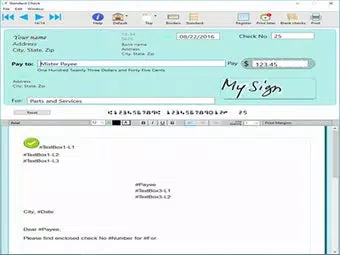
- Easy Check Printing: Users can generate checks in just a few clicks by entering the payee name and amount. The interface is designed to minimize steps, ensuring rapid check creation even for non-technical users.
- Multiple Check Sizes: The software supports standard and wallet-sized checks, accommodating various preferences and check stock formats such as Versacheck and QuickBooks.
- Customization Options: Users can personalize checks with images, signatures, and custom backgrounds, allowing for branding or aesthetic enhancement while maintaining functionality.
- Multiple Bank Account Support: The ability to manage and switch between multiple bank accounts streamlines financial operations for users handling diverse transactions across different accounts.
- Print Deposit Slips: In addition to checks, the application allows users to print deposit slips, consolidating banking tasks into a single tool and reducing the need for multiple software solutions.
These features translate into tangible benefits: a freelancer can quickly issue a payment to a client while adding their logo for professionalism; a small business owner can manage payroll across multiple accounts without switching applications; and an individual can maintain organized financial records by printing deposit slips alongside checks. The integration of these tools into one workflow enhances productivity and reduces administrative overhead.
Interface, UX & Performance
Check Writer III Plus presents a clean, intuitive interface that prioritizes ease of use. The layout is logically structured, with key functions such as payee input, amount entry, and account selection positioned for quick access. Navigation is straightforward, relying on a linear workflow that guides users through the check creation process without unnecessary complexity. Visual elements are minimal but functional, focusing on clarity and readability.
Although the developer did not list formal performance metrics, the application’s lightweight footprint of 10.5 MB suggests efficient resource usage. It is expected to operate smoothly on standard Windows systems, with responsiveness consistent across mid-range and high-end devices. Stability appears to be a priority, given the software’s consistent functionality across multiple versions. The absence of reported crashes or freezes in public forums indicates reliable operation during typical use. However, specific performance benchmarks or compatibility with older hardware were not disclosed.
Platform Compatibility & Technical Requirements
Check Writer III Plus is designed exclusively for the Windows platform, making it accessible to users on desktop and laptop systems running Windows operating systems. The current version is 3.1.1, with a file size of 10.5 MB, indicating a lightweight installation. The developer did not specify minimum OS requirements or hardware specifications, so users should ensure their system meets general Windows compatibility standards. No additional dependencies or third-party tools are required for basic functionality.
While the software is not available on mobile platforms, its desktop focus aligns with the typical use case of check printing, which often involves larger screens and precise formatting. Users seeking a mobile solution should consider alternative tools, though Check Writer III Plus remains a strong option for those working on Windows-based systems.
Pros and Cons
Pros
- Simple, user-friendly interface suitable for non-technical users.
- Supports multiple check sizes and popular check stock formats.
- Enables customization with images, signatures, and backgrounds.
- Manages multiple bank accounts within a single application.
- Prints deposit slips in addition to checks, improving financial workflow efficiency.
Cons
- Available only for Windows, limiting accessibility on macOS or mobile devices.
- Price point of $49.95 may be considered high for casual users.
- Developer did not provide detailed system requirements or performance data.
- Not available as a mobile app or web-based tool.
- Requires a one-time purchase with no subscription model.
FAQ
Is Check Writer III Plus safe to download and use?
Yes, the software is designed for secure check printing and does not require access to sensitive banking credentials. Users maintain full control over their data, and no personal information is transmitted to external servers during normal operation.
Can I use Check Writer III Plus on multiple computers?
The licensing terms were not specified by the developer. Users should refer to the official purchase agreement or contact support for details regarding multi-device usage.
Does Check Writer III Plus support check stock from different providers?
Yes, the software is compatible with various check stock formats, including Versacheck and QuickBooks, ensuring flexibility in physical check printing.
Is there a free version or trial available?
The developer did not mention a free trial or demo version. The application is offered as a one-time purchase at $49.95.
How often are updates released for Check Writer III Plus?
Regular updates are part of the development cycle, with the latest version released on May 17, 2023. Future updates are expected to maintain compatibility and improve functionality.
Final Thoughts
Check Writer III Plus stands out as a reliable and feature-rich check printing utility tailored for users who value efficiency, customization, and financial organization. Its ability to handle multiple accounts, print deposit slips, and support various check sizes makes it a versatile tool for both personal and professional use. While the Windows-only availability and one-time cost may deter some users, the software delivers strong value for those who frequently manage checks and need a secure, integrated solution.
For small business owners, freelancers, and individuals managing complex financial workflows, Check Writer III Plus offers a streamlined path to professional check issuance. Its intuitive design and robust functionality make it a top contender in the productivity category.
Download Check Writer III Plus now


